


Product FAQs adds questions and answers to individual products. They show on the product page in an FAQs tab, as a list of questions that each open their answer when a shopper clicks them.
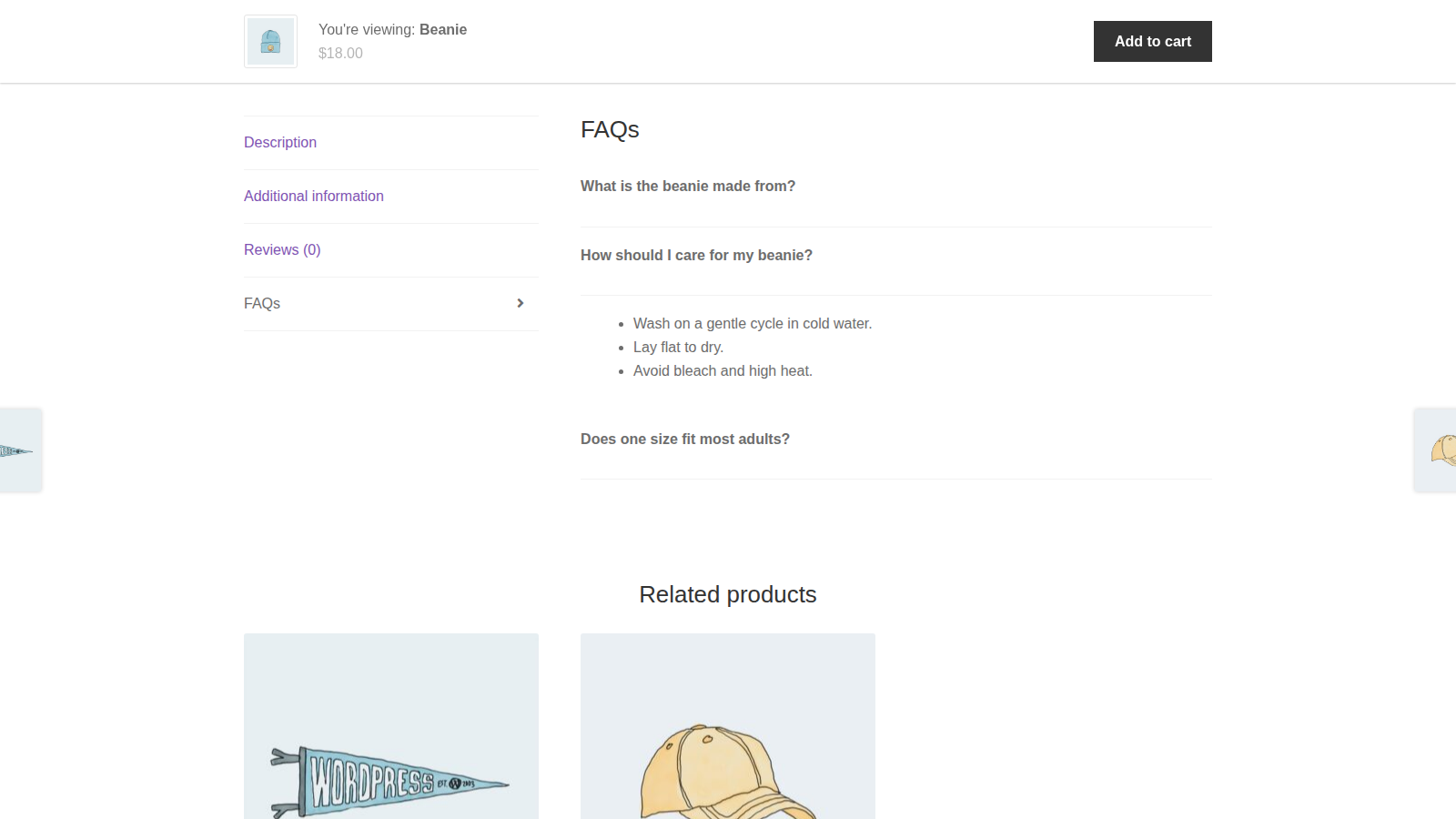
Each FAQ belongs to one product. There are no store-wide or category FAQs, shoppers can’t submit their own questions, and the plugin doesn’t add FAQ structured data to the page.
When you’d use this
- Answer sizing, fit, compatibility or care questions on the product they’re about.
- Cut down on repeat questions before purchase by putting the answers next to the add to cart button.
- Add or update FAQs across many products at once with WooCommerce’s product CSV import.
Requirements
- WordPress 6.3 or later, WooCommerce 8.5 or later, and PHP 7.4 or later.
- Compatible with WooCommerce’s cart and checkout blocks and High-Performance Order Storage.
- You add FAQs in the Product data box of WooCommerce’s product editor.
If WooCommerce isn’t active, Product FAQs does nothing and shows "Product FAQs requires WooCommerce to be installed and activated."
Install and activate
- Bought on kestrelwp.com: install the plugin by following how to install and update WooCommerce extensions.
- Bought on WooCommerce.com: install the plugin from your WooCommerce.com account. Updates come through your WooCommerce.com connection, with no license key to enter.
Product FAQs has no settings screen. Once it’s active, every product’s Product data box has an FAQs tab.
Add FAQs to a product
1. Open the FAQs tab
Go to Products, open the product, and in the Product data box click FAQs.
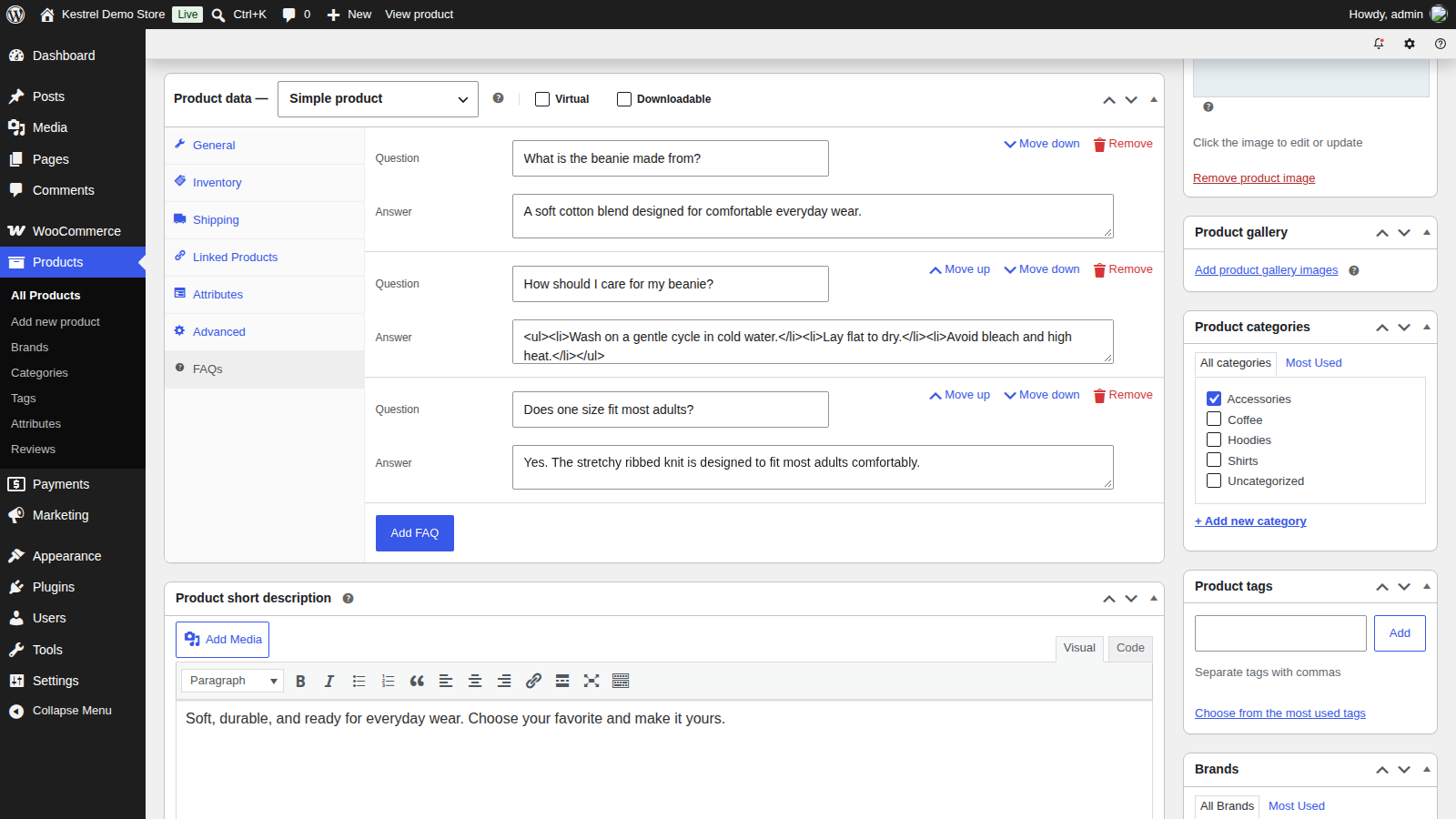
2. Add your questions and answers
Click Add FAQ, then fill in the Question and Answer. Repeat for each FAQ. Both fields accept the formatting WordPress allows in a post, such as links, bold text and lists, and line breaks in an answer become paragraphs.
3. Put them in order
Use Move up and Move down to change the order they show in. Remove deletes an FAQ after you confirm "Are you sure you want to remove this FAQ?".
4. Update the product and check it
Click Update (or Publish on a new product). Nothing in the FAQs tab is saved until you do, including removals and new order. Then view the product: it has an FAQs tab, and clicking a question opens its answer.
How FAQs display
- The FAQs tab appears only on products that have FAQs. It sits after WooCommerce’s own Description, Additional information and Reviews tabs.
- Inside the tab, an FAQs heading sits above the questions. Answers start closed, and clicking a question opens or closes its answer.
- An FAQ shows only when both its question and its answer are filled in. One with an empty field stays saved in the product but isn’t shown.
- The FAQ styling (bold questions, closed answers) loads on single product pages.
Show FAQs with the shortcode
The [wcpf_product_faqs] shortcode shows the FAQs of the product being viewed, with the same heading and open and close behavior as the tab. Use it when your single product template doesn’t include WooCommerce’s product tabs, for example a page builder template without a product tabs element. Add it to a text or shortcode block in that template.
- The shortcode reads the product from the page it’s on, so it shows nothing on pages that aren’t product pages.
- If the template also has WooCommerce’s tabs, the FAQs show twice: once in the tab and once where you placed the shortcode.
Import and export FAQs
WooCommerce’s product CSV tools carry FAQs in a Product FAQs column. Go to Products » All Products and click Export or Import.
Export
The Product FAQs column holds each product’s FAQs as a JSON list, in their display order:
[{"question":"Does it fit a 15-inch laptop?","answer":"Yes, laptops up to 15.6 inches fit."}]Products without FAQs leave the cell empty.
Import
The importer matches a column headed Product FAQs (or wcpf_product_faqs) to FAQs on its own. If your column has another heading, map it to Product FAQs on the column mapping step. Each cell works like this:
- A JSON list: replaces all of that product’s FAQs. Each item needs both a
questionand ananswerkey; items without them are left out. - An empty cell: leaves the product’s FAQs as they are.
- An empty list,
[]: removes all of the product’s FAQs. - Text that isn’t valid JSON: the product’s FAQs are left as they are and the rest of the row still imports. The error is logged under WooCommerce » Status » Logs, in the
wcpf-product-faqs-importlog.
FAQs are saved only for rows that match a product already in your store, or that have an ID in the ID column. When a row creates a new product without an ID, the product is created but its FAQs aren’t saved. Give those rows a SKU, then run the same file again with Update existing products ticked: the rows match the new products by SKU, and their FAQs are saved.
Import keeps text only: links, bold text and lists in a question or answer are removed, so re-add formatting in the product editor.
Common issues
The FAQs tab doesn’t appear
Check that the product has at least one FAQ and that you clicked Update. If the product has FAQs but there’s still no tab, your theme or page builder’s product template doesn’t use WooCommerce’s product tabs. Add the shortcode to the template instead.
An FAQ is missing from the list
An FAQ with an empty question or answer isn’t shown. Fill in both fields and update the product.
If none of a product’s FAQs has both fields filled in, the FAQs tab shows only its heading.
The FAQs show twice
The product template shows WooCommerce’s tabs and also contains the shortcode. Remove one of them.
Products created by a CSV import have no FAQs
Rows that create a new product without an ID don’t keep their FAQs. Give those rows a SKU, then import the same file again with Update existing products ticked, so the rows match the new products by SKU (see Import).
An import didn’t change a product’s FAQs
An empty Product FAQs cell leaves FAQs as they are, and a cell that isn’t valid JSON is skipped. Check the wcpf-product-faqs-import log under WooCommerce » Status » Logs for the rows that failed. To remove FAQs, use [].
"Product FAQs requires WooCommerce to be installed and activated."
Install and activate WooCommerce 8.5 or later. Product FAQs loads nothing without it.
Keep learning
- Product FAQs developer reference (changing the tab title, position, heading and styling with filters)
- How to install and update WooCommerce extensions (installing, updating and fixing upload errors)
- Changing text in a plugin (renaming labels without code)