


Leaving Substack isn’t really about the 10% fee they charge. Substack gives you portability, you can export your subscriber list, and on most paid publications your payments already run through your own connected Stripe account, but it doesn’t give you control over the things that decide how your newsletter looks, feels, and earns: the product, the checkout, the reader experience, the platform’s rules, and the economics. That is really what the Substack vs WordPress choice comes down to, their convenience against control you own.
Moving your paid newsletter to your own WordPress site buys that control back. It only really works, though, if you get the architecture right, and there’s one common shortcut that breaks paid content along the way.
The shortcut that breaks paid newsletters
Most “leave Substack” advice tells you to write your post in WordPress, mark it members-only, and let your email tool pull it into a newsletter through your site’s RSS feed. It sounds efficient, and almost every guide out there repeats it. It also breaks your paywall, which is the sort of thing you only find out the hard way once real subscribers are involved.
A membership plugin like Constellation keeps gated posts out of your RSS and Atom feeds in every restriction mode. In “hidden” and “redirect” modes the post is dropped from the feed entirely; in the content-only “show a message” mode the post stays in the feed but its body is swapped for the paywall notice. The full paid article never reaches the feed, by design. So an RSS-to-email campaign mails your paying subscribers a paywall notice or nothing at all, never the issue they paid for.


Get past that shortcut and the right setup is three parts, each doing one job:
- WooCommerce takes the money: checkout, subscriptions, and payment gateways.
- Constellation gates the archive: who can read what, and when.
- Your email platform sends the actual issue to the people who paid.
If you try to collapse those into one and let the site itself send the newsletter over RSS, you end up either leaking paid content or mailing people a paywall notice. Keep them separate and each piece gets to do the thing it’s actually good at, which is really the whole trick to running this well.
Substack vs WordPress: should you actually move?
Switching isn’t automatically cheaper. You’re trading a percentage of your revenue for a set of costs that mostly track your list size. Substack’s 10% scales with what you earn; your self-hosted costs, hosting plus Constellation plus an email platform, scale mostly with how many subscribers you have. So the more each subscriber pays you, the more the move wins. A couple of examples show the shape:
- $30k a year from about 1,000 subscribers. Substack takes $3,000. Hosting, Constellation at $249, and an email plan for a list that small come in well under that, so you keep most of that $3k. Worth moving.
- $100k a year from a premium list. Substack takes $10,000 a year, every year, forever. Self-hosting is a rounding error next to that, so this one’s an easy call.
The pattern is pretty consistent once you see it: the more each subscriber is actually worth to you, the more moving pays off. A big, cheap, or mostly-free list is where it pays off the least, and sometimes not at all once you add up hosting and an email plan billed on every contact. Either way, plug your own numbers in before you commit to anything.
Substack vs WordPress at a glance
| Substack | WordPress (WooCommerce + Constellation) | |
|---|---|---|
| Platform fee | 10% of revenue | None (you pay only payment processing) |
| Payment processing | ~2.9% + 30¢ | ~2.9% + 30¢ |
| Email sending | Included in the 10% | Separate ESP, scales with list size |
| Other fixed cost | $0 | Hosting + $249/yr for Constellation |
| Subscriber list | Export only | Full access, in your own database |
| Control of checkout & experience | Limited | Full |
| Design and branding | Templated | Fully yours |
| Membership tiers | Free / paid / founding | Unlimited plans with custom access rules |
| Content dripping | Not native | Yes, scheduled from signup |
| Sell products alongside | Limited | Full WooCommerce catalog |
| Built-in discovery | Yes (Substack network) | No, you market it yourself |
The row that matters most is the last one. Substack hands you an audience through its network and recommendations; your own site hands you everything except that. When you leave, discovery becomes your job, and that’s the real cost of the move, more than any setup step.
Where Constellation fits
Constellation is the membership layer in that stack: it decides who can access what, and it runs the recurring billing. The reason to choose it over the other WordPress membership plugins is concrete, not tribal:
- One plugin instead of two. WooCommerce sells memberships and subscriptions as separate products (Memberships plus Subscriptions, $478 a year together). Constellation includes recurring billing, so it’s $249 a year for both jobs.
- Built by the original WooCommerce Memberships team, so the membership and restriction rules are native to WooCommerce rather than bolted on top.
- Your member and payment data lives in your own WooCommerce database, queryable and exportable, not parked in a third-party service.
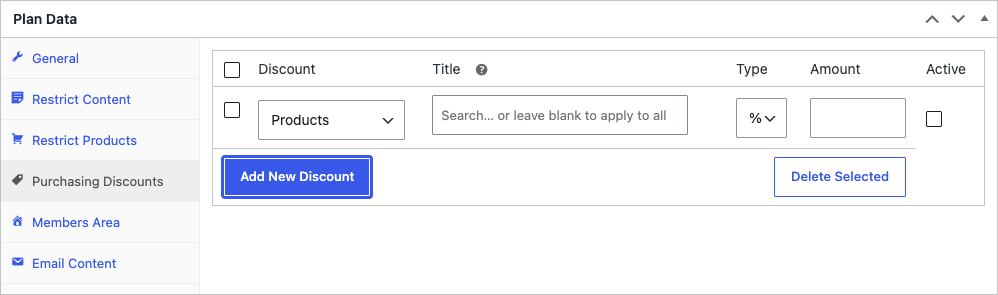
So you’re getting fewer moving parts, a lower annual bill, rules that are native to WooCommerce, and data that stays yours. And on top of that there’s a fair bit a hosted newsletter can’t do at all: unlimited tiers with their own access and pricing, per-tier member discounts, a member directory, custom signup fields, and content that drips out on a schedule.
Setting up the stack
1. Install WooCommerce
From your WordPress dashboard, go to Plugins, add WooCommerce, and run its setup wizard to enter your store details and connect a payment gateway like Stripe.
2. Install Constellation
Add and activate Constellation. It runs its own setup wizard and drops a Constellation menu into your dashboard. Its settings live under that menu, not under WooCommerce’s.
3. Create your membership plan
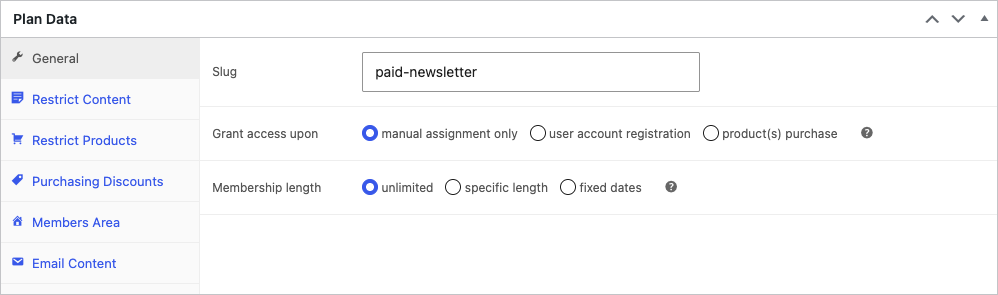
Go to Constellation > Plans > Add New Plan and set it up in the Plan Data panel. Two choices matter most:
- Grant access upon: manual assignment, user account registration (your free tier), or product purchase (your paid tier).
- Membership length: unlimited, a specific length, or fixed dates.
The recurring price, billing interval, trials, and signup fees live on the subscription product your paid plan is tied to, not on this screen.
For a free-plus-paid setup like Substack’s, create one plan for free members and one or more paid plans. You can run several paid tiers at different prices and access levels if you want to go further than Substack ever allowed.
4. Gate your content
You gate content with rules on the plan. In the plan’s Restrict Content tab, add a rule, choose the content type (posts, pages, a whole category, and so on), and either target specific items or leave it blank to protect all of them. Each rule can grant access immediately or on a schedule from the day someone joins, which is how you drip a course or a serialized series.
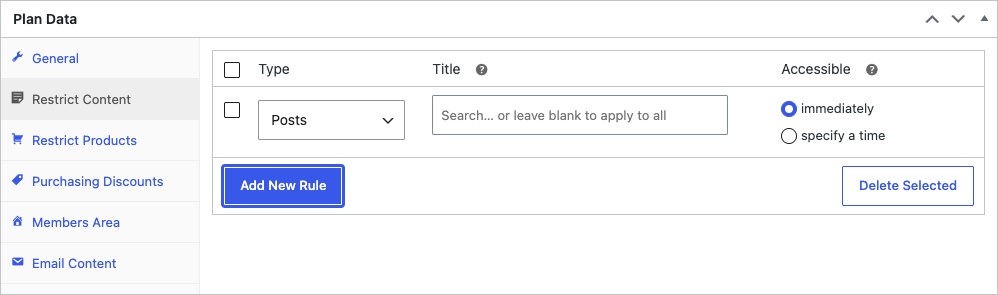
What non-members see is set once, in Constellation’s restriction mode: a preview plus a subscribe message, a redirect to your subscribe page, or the post fully hidden.

Sending the newsletter: choosing an ESP
WooCommerce takes the money and Constellation gates the archive, but neither sends your newsletter. That’s the email platform’s job, and it’s the third leg of the stack. Pick it by what you actually need:
- A simple broadcast newsletter: Mailchimp or MailPoet. Mailchimp has been sending newsletters for over twenty years and has the gentlest learning curve; MailPoet runs natively inside WordPress.
- Ecommerce automation (abandoned-cart flows, segmentation, behavior triggers): Klaviyo. It’s the strongest and the priciest, and the cost climbs with your list size, but you’re paying for the best ecommerce email going.
- WordPress-native sending with no separate platform: ConvesioConvert, which builds email delivery, popups, and segmentation right into WooCommerce.
Whichever you pick, the one thing that has to be true: your email segments are driven by WooCommerce customer and subscription status, not a paid list you keep by hand. All three connect to WooCommerce to sync exactly that. Get it right and “who gets the paid issue” just stays correct on its own as people subscribe, lapse, and cancel, without you thinking about it. Get it wrong and you’re back to hand-keeping a list in a spreadsheet, which is really where most of the “self-hosting is hard” reputation comes from in the first place.
The rest is plugins, for better and worse
Running on WordPress means you’re not boxed into a fixed feature set. Gift subscriptions, forums, affiliate programs, richer analytics, deeper email syncing, there’s a plugin for most of it, and the big email platforms already integrate with WooCommerce. That’s the upside of an open platform.
The real caveat is that every capability you add is one more thing to choose, keep updated, and sort out when it breaks. WordPress gives you the options, and it makes you responsible for the stack at the same time. For a solo paid newsletter that’s usually a fair trade, but it’s worth being clear-eyed about it: you own the whole setup now, updates and maintenance included, rather than renting a platform that takes care of all that for you. The one thing that’s genuinely cleaner when it’s native, multi-seat team or company memberships, is on Constellation’s roadmap rather than shipping today, so confirm it before you move if one account covering a whole team is central to how you sell.
What you actually own
Control is the durable reason to move, and it comes down to ownership you can act on. Your subscriber list lives in your own database, not behind an export button. The content is standard WordPress too, so you can change host, theme, or plugins and your whole archive comes with you. And because billing runs through your own payment account, the customer relationships stay yours.
And no single tool has you hostage: swap your email platform, move hosts, or change your membership setup later and your data doesn’t care.
That’s the real difference from any platform you don’t control. Substack can change its fees, its rules, or its priorities whenever it likes, and your only options are to accept it or leave and hope your people come with you. When you own the stack, those decisions are yours to make instead. You’re not just clawing back the 10%, you’re building something that stays yours, and that tends to matter more the longer you keep at it.
Frequently asked questions
Do I need WooCommerce Subscriptions as well as Constellation?
No. Constellation includes its own recurring billing, so one plugin covers memberships and subscriptions. You only involve the standalone WooCommerce Subscriptions plugin if you already run it, in which case Constellation defers to it automatically.
Do I still need an email tool if I have WooCommerce and Constellation?
Yes. WooCommerce and Constellation manage who your members are, bill them, and gate your content, but they don’t send bulk email. You pair them with an email service provider like Mailchimp, Klaviyo, or ConvesioConvert, and drive its segments off your WooCommerce customer and subscription status.
Is moving off Substack cheaper?
It depends on your numbers. Substack’s 10% scales with your revenue, while your self-hosted costs (hosting, Constellation at $249/yr, and an email platform) scale mostly with your list size. The more each subscriber pays you, the more you save by leaving. A focused list at premium prices comes out well ahead; a large, mostly-free or low-priced list can cost more to run yourself than the 10% you’d save.
Can non-members still see a preview of paid posts?
Yes. Constellation can show a preview plus a subscribe prompt, redirect to a signup page, or hide the post entirely, set per your restriction mode.
What do I give up by leaving Substack?
Mainly built-in discovery. Substack’s network sends you readers. On your own site, growing the audience is your job, which is the real cost of owning the whole thing.
Build the stack Substack won’t give you
Substack got you started and proved people will pay for your writing. When you’ve outgrown what it lets you control, the stack that replaces it is three parts: WooCommerce for checkout, Constellation for memberships and the gated archive, and your own email platform for delivery.
Last updated: July 2026.





Leave a Reply