

Order Delivery for WooCommerce (3.0+) is now the most flexible, production-ready delivery plugin, with built-in support for: time slots, custom cutoffs, local pickup workflows, and even WooCommerce Subscriptions. And in 3.0+, support for the WooCommerce block checkout.
Whether you deliver fresh flowers on weekends, ship subscription boxes monthly, or handle pickups on a specific day of the week (Fridays only, for example!), you’re finally in control of the calendar.
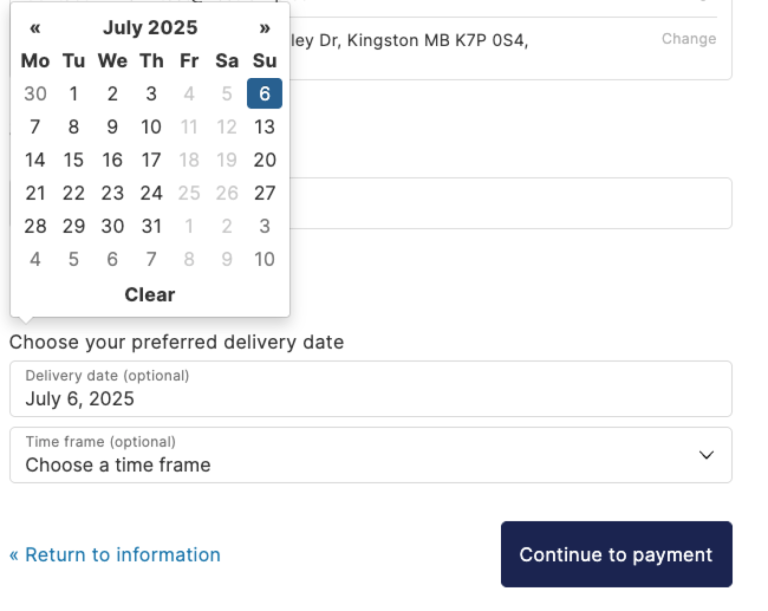
When your store promises an order delivery date, that promise becomes part of the product. Miss it and you don’t just lose revenue today, you also lose trust. You risk the customer not coming back next time.
For local shops, made-to-order sellers, or anyone with a real production schedule, a missed delivery can turn a loyal customer into a one-star review.
Most delivery plugins assume your store runs like Amazon: no real lead times, no time slots, no pickup options, just generic next-day shipping rules.
Speed matters, but what matters more is trust: if you promise a delivery date, your customers expect you to keep it.
What’s New in Order Delivery 3.0+
We’ve been quietly rebuilding Order Delivery from the ground up. Because, honestly, the old code was spaghetti, and setting up a new install felt like reading assembly instructions for a time machine.
Versions 3.0+ introduce better UX, smarter scheduling tools, and long-overdue compatibility improvements. You can add the plugin to a new site without reading a book, now, basically.
Major new Order Delivery features
✅ Block checkout compatibility
Order Delivery now (finally) works with WooCommerce’s modern checkout experience.
📆 Smarter delivery time slot creation
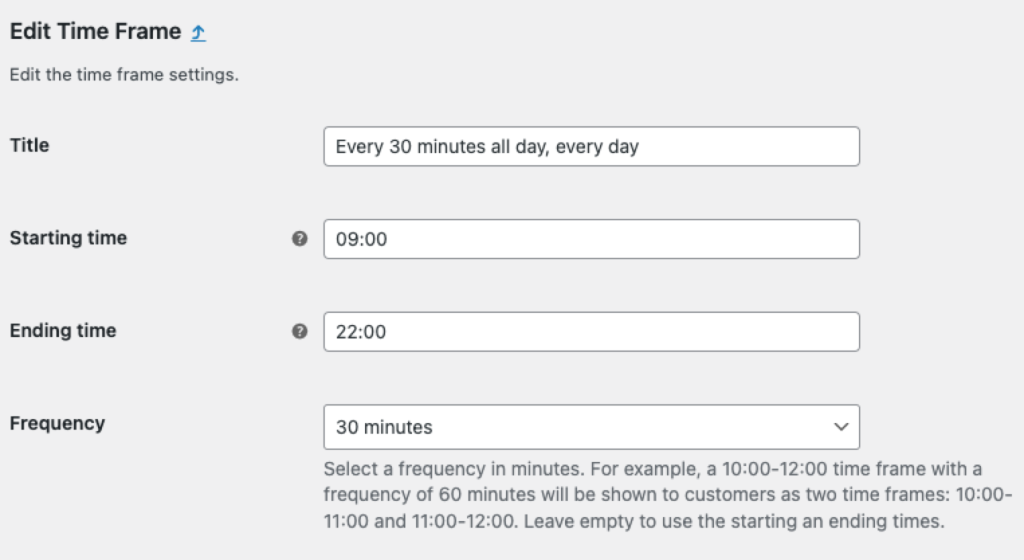
You can now set a frequency for each time slot. Want to offer delivery from 12–2pm in one-hour increments? Set it once and let the plugin handle the rest. We got so many restaurants and other businesses doing same-day delivery asking for help setting up the plugin before this change, and now you can set up 15 minute increments all day, every day. (And auto-select the next available pickup on checkout by default, too.)
🗓️ Improved shipping & delivery calendar UI
The admin-facing calendar now has proper month/week toggle views, improved responsiveness, and cleaner modals. We also added some back-end timezone indicators to prevent setup mistakes.
💬 Clearer fee labels
We renamed order delivery date/pickup date fees at checkout to “Scheduled delivery” or “Scheduled pickup,” so customers don’t mistake them for shipping method charges. This may seem minor, but I genuinely didn’t intuitively understand which fees we were adding prior to this change.
🌍 Global language support
Order Delivery for WooCommerce now supports over 30 languages out of the box, from Spanish and German to Japanese, Hebrew, and Hindi.
🔧 Under the hood
🧠 Rebuilt time frame logic
We streamlined the way time frames are defined and reused, less duplication, easier updates. (This isn’t the most exciting update on the front-end, and your customers aren’t even going to notice, but it unlocks a lot of potential!)
⏰ Flexible shipping cut-off times
Define a global cut-off time (e.g. 2pm daily), then override it on specific weekdays to match your production schedule.
And we’ve made a few improvements to existing features, too:
📉 Clearer order delivery date limits
With the “count only available delivery days” setting, you can exclude holidays and block specific dates from the calendar range, so customers don’t get confused or frustrated by dates they can’t select. This used to work surprisingly inconsistently depending on your configuration. A minor settings change could throw the whole thing into a tailspin. Now it shouldn’t.
🔍 Delivery-based order filtering
Need to see all deliveries scheduled this weekend? Now you can. Filter your admin order list by order delivery dates or shipping date to stay ahead of fulfillment.
Why this matters for WooCommerce merchants
Most stores aren’t faceless warehouses. You have prep time, staff, and real logistics to juggle. Order Delivery is now built to make that easier.
Order delivery dates built for scale and clarity
Whether you’re baking 5 cakes a day or delivering 200 floral arrangements across town, you need tools that keep pace with your growth. You can set order caps per day or time slot to prevent burnout and missed deliveries.
Customers only see the delivery dates and windows you’ve planned for and pre-approved. That means no mystery gaps, no overbooked days, and no frantic customer emails asking “Where’s my order?”
It’s a better experience for everyone on both sides of the transaction.
Production and fulfillment-friendly
Delivery time slots and cutoff rules help ensure your operations team isn’t caught off guard, whether you’re managing local courier drops or batching made-to-order shipments.
You set the rules: lead time, cutoffs, blockout dates. Once you do, Order Delivery for WooCommerce enforces them automatically so your team never has to scramble or overpromise. It’s like a buffer between your checkout and your production line.
Subscription-ready Delivery Dates, too
Selling fresh meals, flowers, or recurring products? Order Delivery integrates directly with WooCommerce Subscriptions to calculate delivery dates for renewal orders, including allowing your customers to reschedule renewal shipments.
And Order Delivery for WooCommerce for developers
- Action and filter hooks throughout the checkout and scheduling flow
- Template overrides for full layout control
- Custom time slot logic per shipping method or region
- Optional shortcode and meta field support for headless or custom storefronts
- Compatibility workarounds for major themes and checkout plugins (like CheckoutWC)
Need to do something weird? You probably can already, but if you can’t, we want to hear about it. We’ll help you figure it out.
If you’re already using Order Delivery to set order delivery dates, version 3.0+ is a significant step up, but there are a few things to know as you update:
⚠️ Read before updating
- 3.0+ introduces major changes. We strongly recommend testing in a staging environment first. If you have any issues, reverting immediately is possible, but not recommended in a production environment.
- Template overrides may need review. If you’ve customized
form-delivery-date.phpin your theme, you’ll need to update it to support new features like backorder notices.
If you’ve already updated, you’re good to go. Your delivery calendar just got smarter, faster, and way easier to manage. Most merchants won’t need to touch anything.
🔮 What’s coming next?
We’re focused on even deeper flexibility for local delivery, pickup, and hybrid workflows and integrations with other popular plugins. We want Order Delivery for WooCommerce to add everything and anything that makes it easier to handle local fulfillment or expectation-setting for shipped orders.
As always, your feedback shapes the roadmap. Have a pain point? Want an easier way to set order delivery dates that we don’t yet accomodate?
Let us know! We absolutely want to hear from you if you’re thinking about using our plugin or even if you don’t quite think it’s right for your needs. Tell us what we’re missing!
Ready to deliver on your order fulfillment promises?
Thousands of WooCommerce stores trust Order Delivery to keep their operations sane and their customers happy. And now, with version 3.0+ from Kestrel, you’ve got more control, clarity, and reliability than ever before.
So, if your current setup feels duct-taped together or makes customers guess when their order will arrive, it’s time for an upgrade.
✅ Set clear expectations.
✅ Avoid overbooking.
✅ Deliver on time, every time.
With full support for time slots, custom cutoff rules, local pickup, and subscription renewals, Order Delivery puts your entire scheduling flow under your control.
Get Order Delivery on WooCommerce.com →
30-day money-back guarantee. No surprises, just better scheduling.

Leave a Reply