


I’m excited to share we’ve added a highly-requested feature: Rental Products 7.1 lets you rent by the hour. Customers pick a start time and a duration, so the kayak that goes out at nine can go out three more times before the sun sets on a busy Saturday. The release also adds pricing adjustments, so seasonal rates and trade discounts become one rule instead of an edit to every product.
Rent by the hour with time based rentals
A rental product can now be Day based or Time based, chosen in the product editor’s Product data header, next to the rental type. A time based product is booked in slots within a single date: customers choose a date, then a Start time and a Duration, instead of a range of days.
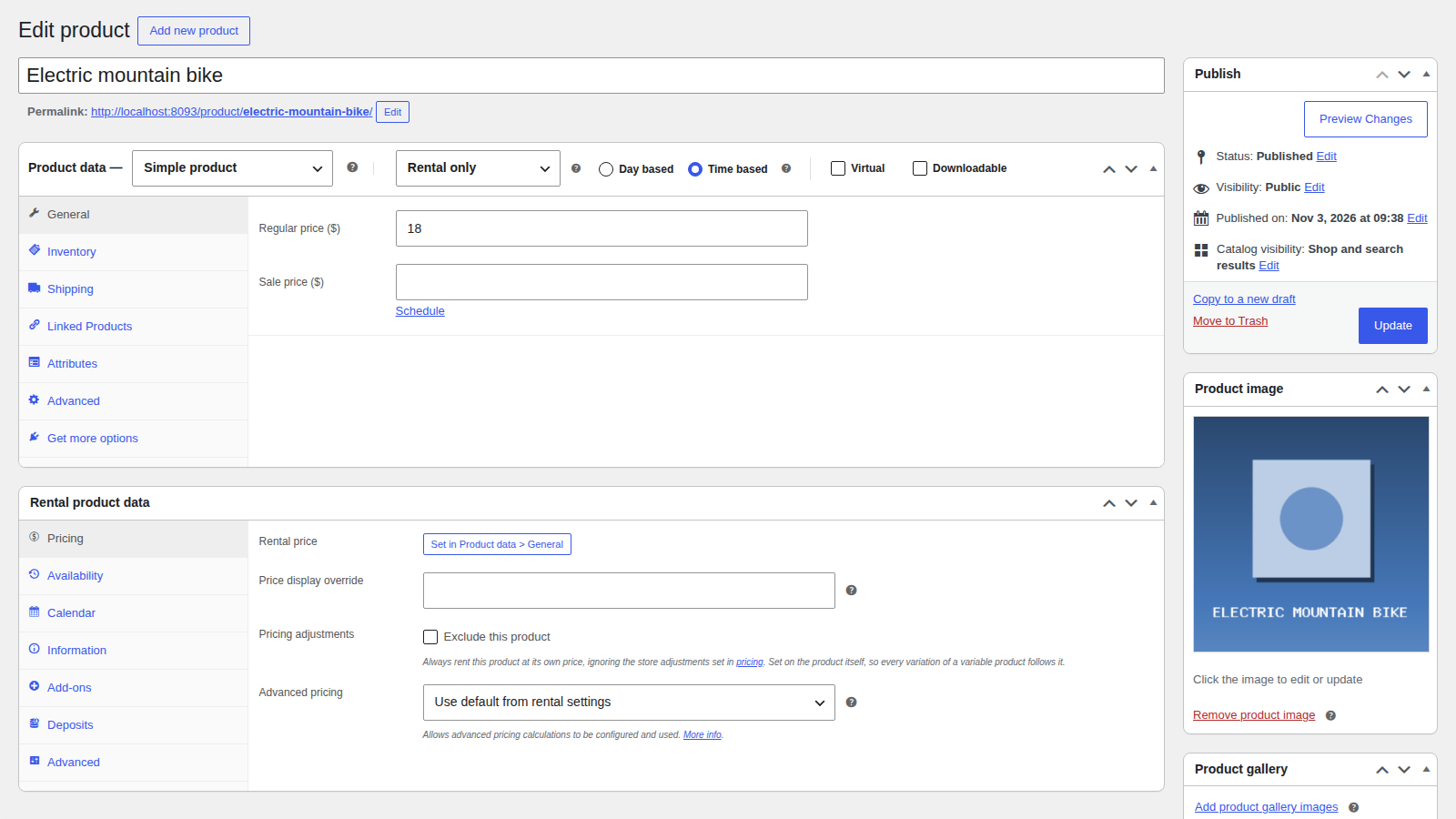
Set your hours and slot length
On the product’s Availability tab, add an operating window with when you open and close, how long a slot lasts, and the weekdays it runs. Each window can have its own Price per slot (or use the product’s rental price) and its own Max out at once, so a weekday window and a weekend window can price and stock differently. Add as many windows as you need, as long as they don’t overlap on the same day.
A few settings shape what customers can book:
- Minimum slots and Maximum slots set the shortest and longest booking.
- Turnaround (minutes) leaves time after each return to clean, charge, or check the item.
- Lead time (minutes) sets how far ahead a booking has to be made.

Rent the same item several times a day
Because a booking only takes up part of the day, one item can go to several customers on the same date. A bike that’s back at noon can go out again at noon, or after its turnaround time if you set one. That’s where hourly rentals let you drive more revenue: the item isn’t sitting idle for the rest of the day after a two-hour booking.

Time based rentals work across the rest of the plugin, too. You can add and edit them on the order screen with the same start time and duration choices customers see, and the Rentals dashboard, calendar, calendar feed, and inventory show them by their times. Add-ons can be charged per slot with Multiply add-ons total by number of slots booked.
Where day based rentals still fit
A time based booking stays within one date, so a hire that runs overnight is still a day based rental, and in-person pick up and return times cover set handover times on multi-day hires. Time based rentals aren’t available for rental bundles or with in-person pick up and return, and each product still needs a regular price set in WooCommerce.
Change prices by season, customer, or category
The second big addition is pricing adjustments, managed on a new Rentals » Pricing screen. An adjustment raises or lowers rental prices by a percentage of the whole rental, or by a fixed amount added once per item however long the rental, limited by any mix of:
- Dates: a date range, with Repeat every year for seasons that come back.
- Customers: all customers, or specific user roles, such as trade customers or guests who aren’t logged in.
- Products: all rental products, or specific categories, such as bikes or party equipment.
That covers summer peak pricing, a trade discount, or a holiday rate on one category, without editing every product or writing code.
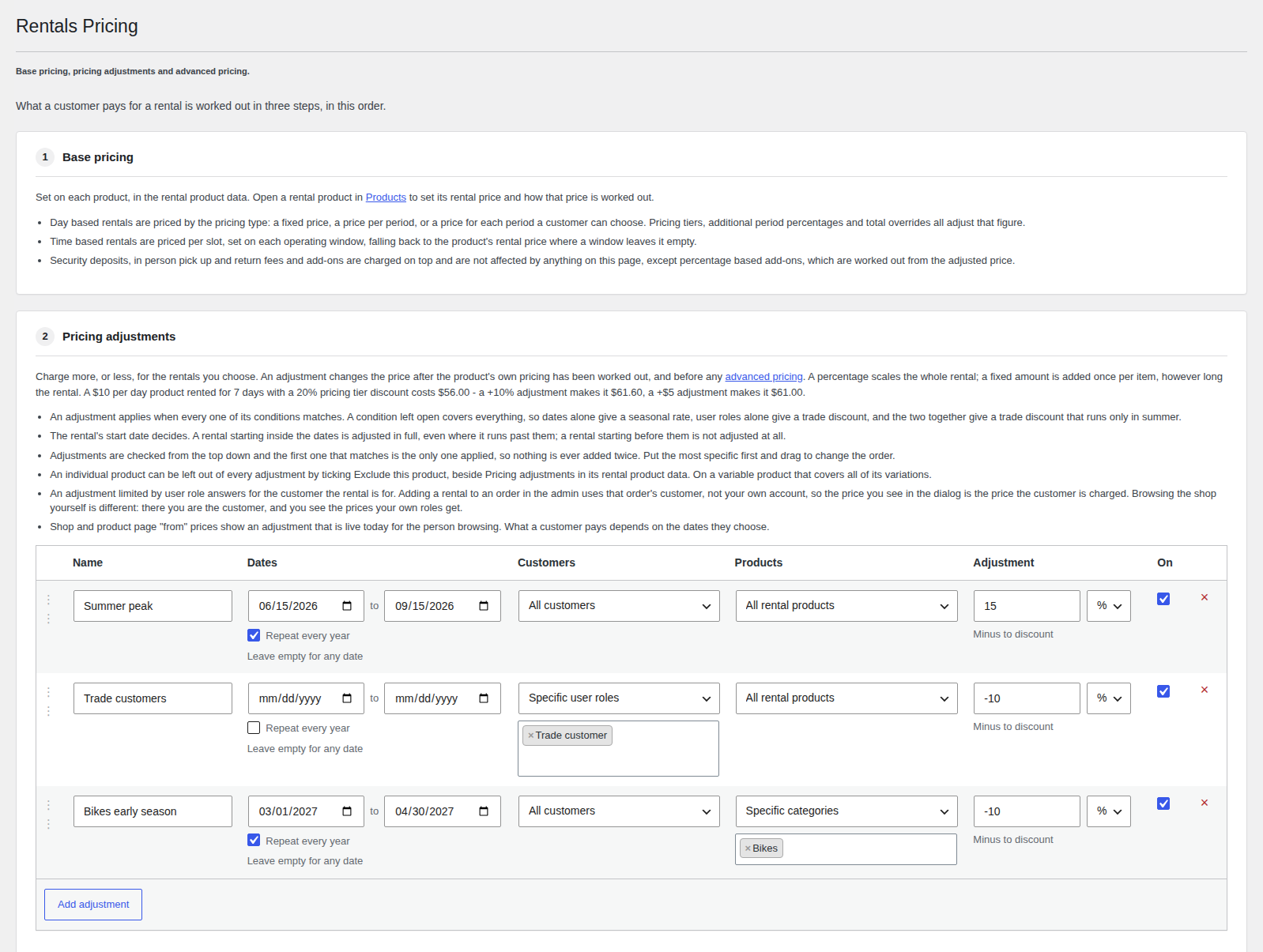
Adjustments are checked from the top of the list down, and only the first one that matches applies, so they never stack; drag them to set the order. The rental’s start date decides which rule applies. A product that should never be adjusted can opt out with Pricing adjustments: Exclude this product on its Pricing tab.
The Pricing screen also sets out the three steps a rental price goes through: the product’s own pricing, then any pricing adjustment, then advanced pricing for stores that use custom code. The Rentals dashboard and the WordPress dashboard widget now show how many adjustments apply today, with a link to the Pricing screen.
Also in 7.1
- In modern mode, store-wide disabled rental dates now block bookings, as they do in legacy mode.
- Rentals added on the order screen now get their security deposit.
- In-person pick up and return fees are now added per item on the product page, matching the cart, and are taxed correctly.
- The rental form total follows the currency chosen in Currency Converter Widget.
Before you start
Time based rentals and pricing adjustments need modern mode. If your store upgraded from 6.x and still runs legacy mode, disable Legacy mode under Rentals » Settings » Advanced first: in legacy mode the Pricing screen doesn’t appear, and a time based product can’t be added to the cart. If you already change prices with advanced pricing code, review it before you add adjustments, because both would apply to the same price.
The first admin page load after updating can take longer on stores with many rentals, while the reservations table is updated. Then clear any page, CDN, or CSS and JavaScript optimization caches, because some of the plugin’s styles and scripts have moved to new file locations.
Get started
Rental Products 7.1 is available now from your plugins screen. To set up your first time based product, see Set up time based rentals, and for adjustments, see Set up pricing adjustments. New to the plugin? You can purchase Rental Products for WooCommerce starting at $199.





Leave a Reply