WooCommerce cashback rewards let you automatically award store credit to customers when they complete purchases. This builds loyalty while encouraging repeat business. Customers earn credit they can only spend at your store.
Account Funds 4.0 introduced a flexible cashback system with two distinct triggering methods and extensive eligibility controls. This guide covers everything from basic setup to advanced configurations.
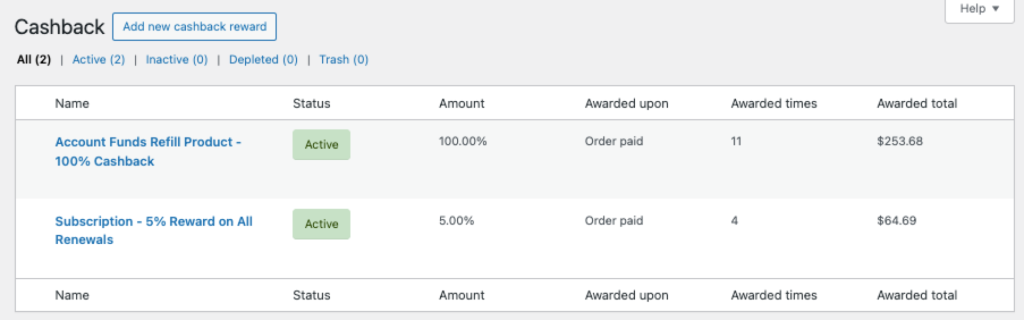
How WooCommerce Cashback Works
When you create a cashback reward, you define:
- Trigger — When store credit is awarded (order paid vs. individual product purchase)
- Amount — Fixed amount or percentage of order/product value
- Eligibility — Which orders or products qualify
- Limits — Budget caps, award counts, or per-customer restrictions
Store credit appears in the customer’s account immediately when the triggering event occurs. Typically when an order reaches the “Processing” status.
Cashback Trigger Types
There are two fundamentally different ways to award cashback. Choose based on your loyalty program goals.
Order Paid Trigger
Awards store credit based on the total order value when payment is confirmed. Use this for:
- Percentage-based loyalty programs (e.g., “Earn 5% back on every order”)
- Minimum purchase incentives (e.g., “$10 back on orders over $100”)
- Category-wide promotions (e.g., “10% back on all apparel orders”)
The cashback calculation uses the order subtotal. You can set minimum and maximum order amounts to control eligibility.
Product Purchase Trigger
Awards store credit for each qualifying product within an order. Use this for:
- Product-specific promotions (e.g., “$5 back when you buy Product X”)
- Review incentives (pair with milestone rewards)
- Inventory clearance (extra cashback on specific items)
With this trigger, customers can earn multiple cashback awards from a single order if they purchase multiple qualifying products.
Creating a Cashback Reward
Navigate to Store Credit > Cashback in your WordPress admin. Click Add New to create a reward.

Basic Settings
Label — Internal name for your reference (customers don’t see this).
Trigger — Choose “Order paid” or “Product purchase” based on your use case.
Amount — Enter the cashback value. For “Order paid” triggers, you can toggle between fixed amount and percentage. Product purchase triggers typically use fixed amounts.
Currency — Defaults to your store’s base currency. Multi-currency stores can create separate cashback rules per currency.
Eligibility Rules for Order Paid
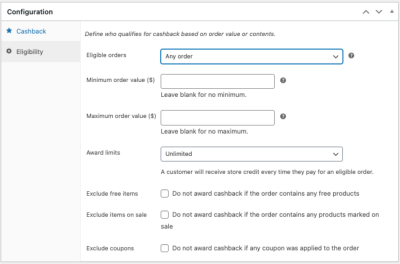
When using the “Order paid” trigger, you control which orders qualify:
Eligible orders options:
- Any order — All paid orders earn cashback
- Order contains specific products — Only orders with selected products
- Order does not contain specific products — Exclude orders with certain products
- Order contains product categories — Orders with items from selected categories
- Order does not contain product categories — Exclude orders with items from certain categories
- Order contains product types — Filter by simple, variable, subscription, etc.
- Order does not contain product types — Exclude certain product types
Minimum order amount — Orders must meet this subtotal to qualify.
Maximum order amount — Orders above this amount don’t qualify (useful for preventing abuse on bulk orders).
Eligibility Rules for Product Purchase
When using “Product purchase” trigger:
Eligible products options:
- All products — Every product earns cashback
- Some products — Only selected products earn cashback
- Some product categories — Products within selected categories
Product quantity behavior:
- Multiply — If customer buys 3 of a qualifying product, they earn 3× the cashback
- Ignore — Customer earns cashback once per product regardless of quantity
Exclusion Options
Fine-tune eligibility with these exclusions (available for both triggers):
Exclude free products — Products with $0 price don’t earn cashback.
Exclude products on sale — Sale-priced items don’t earn cashback.
Exclude orders with coupons — If a coupon is applied, no cashback is awarded.
Award Limits
Control how many times cashback can be earned:
Award limits options:
- Unlimited — No restrictions on how often customers earn
- Once per customer — Each customer can only earn this cashback once, ever
- Once per product — (Product purchase trigger only) Each customer earns once per unique product
Award limit (count) — Maximum number of times this reward can be triggered across all customers. Useful for promotions with limited availability (“First 100 orders get 10% back”).
Award budget — Maximum total store credit to award. When reached, the reward stops triggering.
Expiration Settings
Reward expires on — Date when this reward configuration stops being active.
Awarded credit expires after — How long customers have to use their earned credit (e.g., “90 days” means credit expires 90 days after being awarded).
Common Cashback Configurations
5% Loyalty Program
A straightforward earn-back program on all purchases:
- Trigger: Order paid
- Amount: 5% (percentage)
- Eligible orders: Any order
- Award limits: Unlimited
$10 Back on Orders Over $100
Incentivize larger orders:
- Trigger: Order paid
- Amount: $10 (fixed)
- Eligible orders: Any order
- Minimum order amount: $100
- Award limits: Unlimited
Premium Category Bonus
Extra rewards for high-margin categories:
- Trigger: Order paid
- Amount: 10% (percentage)
- Eligible orders: Order contains product categories → Select your premium category
- Award limits: Unlimited
New Customer Welcome Bonus
One-time cashback for first purchase:
- Trigger: Order paid
- Amount: $5 (fixed)
- Eligible orders: Any order
- Award limits: Once per customer
Product Launch Promotion
Cashback on specific new products:
- Trigger: Product purchase
- Amount: $2 per product
- Eligible products: Some products → Select launched products
- Product quantity: Multiply (earn more for buying more)
- Award budget: $1,000 (caps total promotion cost)
How Customers See Cashback
Customers receive notifications about available cashback in several places:
- Product pages — Badge showing potential cashback
- Cart — Summary of cashback they’ll earn
- Checkout — Confirmation of pending cashback
- Order confirmation email — Details of credited amount
- My Account > Store Credit — Transaction history showing earned cashback
These display elements are controlled in Store Credit > Settings > Display.
What Happens When Orders Change
Order Refunded
If a full refund is processed, the cashback credited from that order is automatically deducted from the customer’s balance. Partial refunds may proportionally reduce cashback depending on your configuration.
Order Cancelled
Cancelled orders that previously triggered cashback will have that credit reversed.
Order Status Changes
Cashback triggers on the transition to a “paid” status (typically Processing or Completed, depending on payment method). If an order is manually moved back to Pending, the cashback isn’t automatically reversed—use refunds for that.
Multiple Cashback Rewards
Customers can earn from multiple active cashback rewards on a single order if they meet the eligibility criteria for each. For example:
- A 5% loyalty program on all orders
- A 10% category bonus on electronics
An order containing electronics could earn both the base 5% and the additional 10% on the electronics portion.
Troubleshooting
Cashback Not Triggering
Check these common causes:
- Reward status — Ensure the reward is “Active” not “Inactive” or “Depleted”
- Eligibility rules — Verify the order/products meet all configured criteria
- Exclusions — Check if sale items or coupons are excluding the order
- Award limits — Customer may have already reached their limit
- Budget/count limits — The reward may have reached its global limit
- Expiration date — Confirm the reward hasn’t expired
- Order status — The order must reach “Processing” or “Completed” status
Wrong Amount Credited
Percentage cashback is calculated on the order subtotal (excluding taxes, shipping, and fees). If you’re seeing unexpected amounts:
- Check if discounts from coupons reduced the calculation base
- Verify which products are included in the eligibility rules
- Review whether quantity multiplication is configured as expected
Customer Not Seeing Cashback Badges
Display elements require configuration in Store Credit > Settings > Display. Ensure the relevant options are enabled for product pages, cart, and checkout.
Developer Notes
Cashback rewards use the Kestrel\Account_Funds\Store_Credit\Rewards\Cashback class. Key hooks for customization:
- Cashback configurations are stored in a custom database table (not post meta)
- The wallet ledger tracks all credits and debits with full transaction history
- Each transaction links back to its originating reward configuration and triggering event
For developer documentation and available filter hooks, visit our developer program.