


WooCommerce rental quotes let you review orders before accepting payment with Rental Products for WooCommerce. Customers submit requests, you evaluate them, and stock only gets reserved when you approve.
This workflow makes sense for rental businesses that need to verify availability before committing inventory, adjust pricing for specific requests, or control which orders get fulfilled when demand exceeds supply.

This is currently a solution that we are testing out and we would love your feedback. Rental Products for WooCommerce supports this today, and if you try it out, we’d love to hear what you like and what you’d like to see improved. Reach out to support with any questions or feedback!
When you need a quote workflow
Consider a skip bin rental business. You have three 6-cubic-metre skips and a busy weekend coming up.
Friday afternoon, two orders come in for the same skip size at two different times over the same dates. With standard checkout, the first order locks your inventory and the second customer sees “unavailable.” But if the first customer hasn’t paid yet or, they’re a brand new customer who you have not worked with in the past, you may not want to reserve that inventory, potentially leaving you with blocked inventory and a lost sale.
With a quote workflow, both orders go through. You see them both in your queue, unpaid, with inventory still available. You can:
- Contact both customers to confirm dates and availability
- Prioritize the larger or more reliable customer
- Offer the second customer alternative dates
- Wait to see who pays first before reserving stock
The same logic applies to camera rentals, construction equipment, event supplies, of course. Realistically, any situation where you’re renting out your limited set of products with WooCommerce.
Any situation where you want human judgment before inventory commits.
How rental quotes work
By default, Rental Products reserves stock the moment an order is placed. This prevents double-bookings but doesn’t give you a review step.
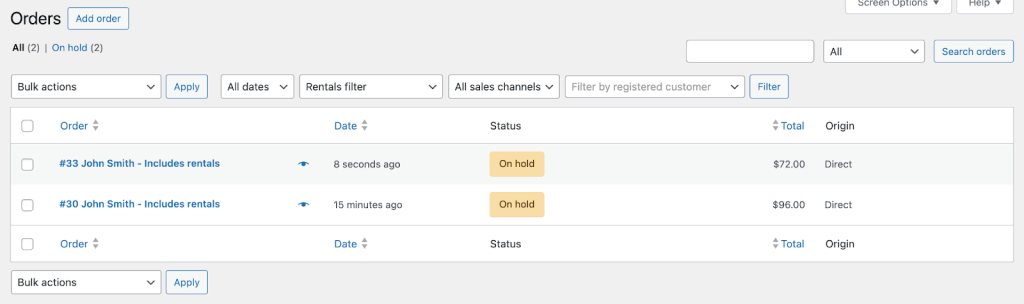
With our conditional reservation feature, you flip this behavior: customers place orders that sit in your queue without locking inventory. You review incoming requests, approve the ones you want, and stock gets reserved only when you set the order to a paid status.
What you get
- Order review before commitment — incoming requests don’t block availability for other customers
- Priority control — you decide which orders get fulfilled, not the checkout timestamp
- Pricing flexibility — adjust orders before moving them to payment
- No double-booking risk — stock still gets reserved when you’re ready
Setting it up
The feature uses a filter hook you add to your site. Takes about five minutes if you’re comfortable with code snippets, or your developer can handle it.
We’ve documented the complete setup with code examples and screenshots: Reserve rental stock only when orders are paid
For an even more structured workflow, you can pair this with WooCommerce Order Status Manager by the team at SkyVerge to create custom statuses like “Quote Requested” or “Under Review.”
Current limitations
This is a workaround, not a full quoting system. A few things to know:
- The rental calendar and dashboard don’t show unreserved rentals (they only appear once payment is confirmed)
- There’s no frontend price hiding or formal quote document generation
- You’ll manage order status manually
We’re tracking interest in building a native UI for quote workflows. If you set this up and want to see it expanded, let us know what’s missing and how we could make this perfect for your business.
Rental Products for WooCommerce supports quotes today
The functionality exists today in Rental Products for WooCommerce and works with the current version.
Get Rental Products for WooCommerce — $199/year, 30-day money-back guarantee.
Already have a license? Read the setup guide and you’ll be accepting rental quotes in minutes.





Leave a Reply