


Rental Products tracks stock by date. Each rental product has a total number of units, and every rental reserves some of them for its dates. A customer can book a date range only if enough units are free on every date in it. This page explains what reserves stock, what frees it, and why a date can show as unavailable.
How availability is calculated
For each date, the units available are the product’s Rental stock (in and out) minus the units reserved on that date. A product with no rental stock set has unlimited units. Each variation has its own stock.
A rental reserves its units from the start date through the end date, plus the product’s Return days threshold (3 days when empty), so the item has time to come back before it goes out again. Days are counted inclusively: a Monday to Thursday rental with a 2-day return threshold reserves the unit Monday through Saturday.

The booking rules on the product’s Availability tab then narrow which dates can be chosen at all: the lead time, minimum and maximum days, a required start day, disabled dates and days, and how far ahead the calendar goes (730 days by default). Each is defined in set up a rental product.
Rental Products checks the dates are still available when a rental is added to the cart and while it’s in the cart, and the order reserves the units once it’s placed.
Time based rentals
A time based rental takes its units for a stretch of one date rather than the whole date, so the same unit can go to several customers on the same day:
- A start time is offered when every slot the booking covers has a unit free at that time. A unit returned at 12:00 can go out again at 12:00, unless the product has a Turnaround (minutes), which holds it back for that long after each return.
- Max out at once on an operating window caps how many units can be out in each of its slots, even when you own more or rental stock is unlimited.
- Lead time (minutes) hides start times that are too soon, and start times that have already passed today are never offered. The day based options (start days threshold, return days threshold, minimum and maximum days, start day, disabled days and start/end dates or days) don’t apply.
- Disable rental dates, on the product or store-wide, closes the whole date.
- In the cart, two bookings of the same unit at different times on one date fit together.
- The availability checker shows a time based product as available on a date when at least one start time on it has room for the quantity.
Which order statuses hold stock
An order reserves its rentals while it’s in a status that holds stock. These are the defaults:
| Order status | Rental stock |
|---|---|
| Pending payment | Held |
| On hold | Held |
| Processing | Held |
| Completed | Held, but its rentals are marked returned while Return rentals in completed orders is on (the default) |
| Failed | Held, unless Cancel rentals in failed orders is on, which cancels the rentals |
| Cancelled | Released, and the rentals are canceled |
| Refunded | Released, and the rentals are canceled |
| Partially Paid (Deposits & Partial Payments for WooCommerce) | Held |
| Draft (block checkout drafts) | Not reserved |
| Trash | Held, until the order is permanently deleted |
A few things follow from this:
- Trashed orders still hold stock. Empty the trash, or permanently delete the order, to free its dates.
- Cancelling by status is for good. A rental canceled because its order was set to Cancelled, Refunded or Failed isn’t rebooked if the status changes back, or if a failed payment is retried. Add the rental again on the order.
- Refunds don’t free stock. A refund on its own, full or partial, leaves the rental reserved until you cancel it or the order status changes. See refunds and deposits.
- Checkout drafts never reserve stock. That’s why Checkout draft restrictions hides them and stops orders being moved to Draft.
The order settings are in Rentals » Settings » Orders.
Lead time, earliest date and timezone
The Start days threshold sets the earliest start date: today plus that many days. At 0, rentals can start today; at 1, tomorrow. An Earliest available date pushes the first start date later:
- Modern handlers: both apply, and the later date wins.
- Legacy mode: while the earliest available date is in the future, it replaces the start days threshold.
"Today" and every rental date follow your WordPress timezone under Settings » General. Choose your store’s city rather than a UTC offset, so dates stay right through daylight saving changes. If your store runs version 7.0.0 in a timezone other than UTC, customers using the modern handlers may find the first offered date rejected; update to the latest version.
Return days threshold and replenishment
The return days threshold keeps a unit unavailable after each rental ends. To add time for cleaning or repairs without telling customers, raise the threshold and turn off Return days display, so customers don’t see the longer period.
When a rental is marked returned early:
- With Immediate rental stock replenishment on (the default for new installs), the unit is free straight away.
- With it off, the unit stays reserved until its end date plus the return threshold.
Archived rentals always count as returned, whatever this setting.
Bundles
A bundle is available for as many complete bundles as its products can supply on the dates, and renting a bundle reserves each of its products. One unavailable product makes the bundle unavailable. With the modern handlers the bundle’s own rental stock isn’t used; in legacy mode, a rental stock on the bundle also caps it. See create rental bundles.
In-person handovers
With in-person pick up and return, the unit is handed over at set times rather than shipped, so the return days threshold is 0. Time restrictions make return times come before pick up times for rentals longer than a day (the rule).
With the modern handlers, that lets a unit returned in person go out to the next customer the same day: on a date where returns and pick ups meet, the units coming back count towards the ones going out. In legacy mode, a rental may not be able to start on the day another rental of the same unit is returned when stock is limited.
Reserve stock only when orders are paid
By default, Rental Products reserves stock the moment an order is placed, whatever its payment status. That prevents double bookings when customers pay by methods that don’t complete instantly, such as bank transfer.
Some rental businesses prefer to let customers place orders without tying up stock, then reserve it only when payment comes through, so whoever pays first gets the item. There’s no setting for this: a developer adds a short code snippet, given in the developer reference.
How it works
With the snippet active, stock is reserved only once an order reaches a paid status: WooCommerce’s paid statuses, such as Processing and Completed (and any status another plugin registers as paid), plus Partially Paid from Deposits & Partial Payments for WooCommerce.
- Customer A places an order for 4 units with an offline payment method, so the order is Pending payment. The stock isn’t reserved.
- Customer B orders 3 of the same units for the same dates. Both orders go through, because the stock isn’t reserved yet.
- When Customer A’s payment clears and you set the order to Processing, those 4 units are reserved.
- Customer B’s order now needs more units than are free. You cancel it or agree other dates or quantities with them, by hand.
What you’ll see in the admin
- Each unpaid rental line says "Stock not reserved as order unpaid." with how many units are currently available on its dates.
- An unpaid order with rentals that are no longer available can’t be moved to a paid status: "Order cannot be changed to a paid status (…) as there are unavailable rentals (…)." Cancel the unavailable rentals or change their dates first.
- An unpaid order can’t go straight to Completed either: "Order status cannot be changed as previous status (…) is not a paid status (e.g. Processing)." Set it to Processing first, then complete it.
- The rentals dashboard, calendar and inventory leave out unreserved rentals, and say so: "Data on this page excludes any orders where rental stock not yet reserved."
Customers can’t pay for an unpaid rental order from My Account while the snippet is active, so send them another way to pay, such as an invoice.
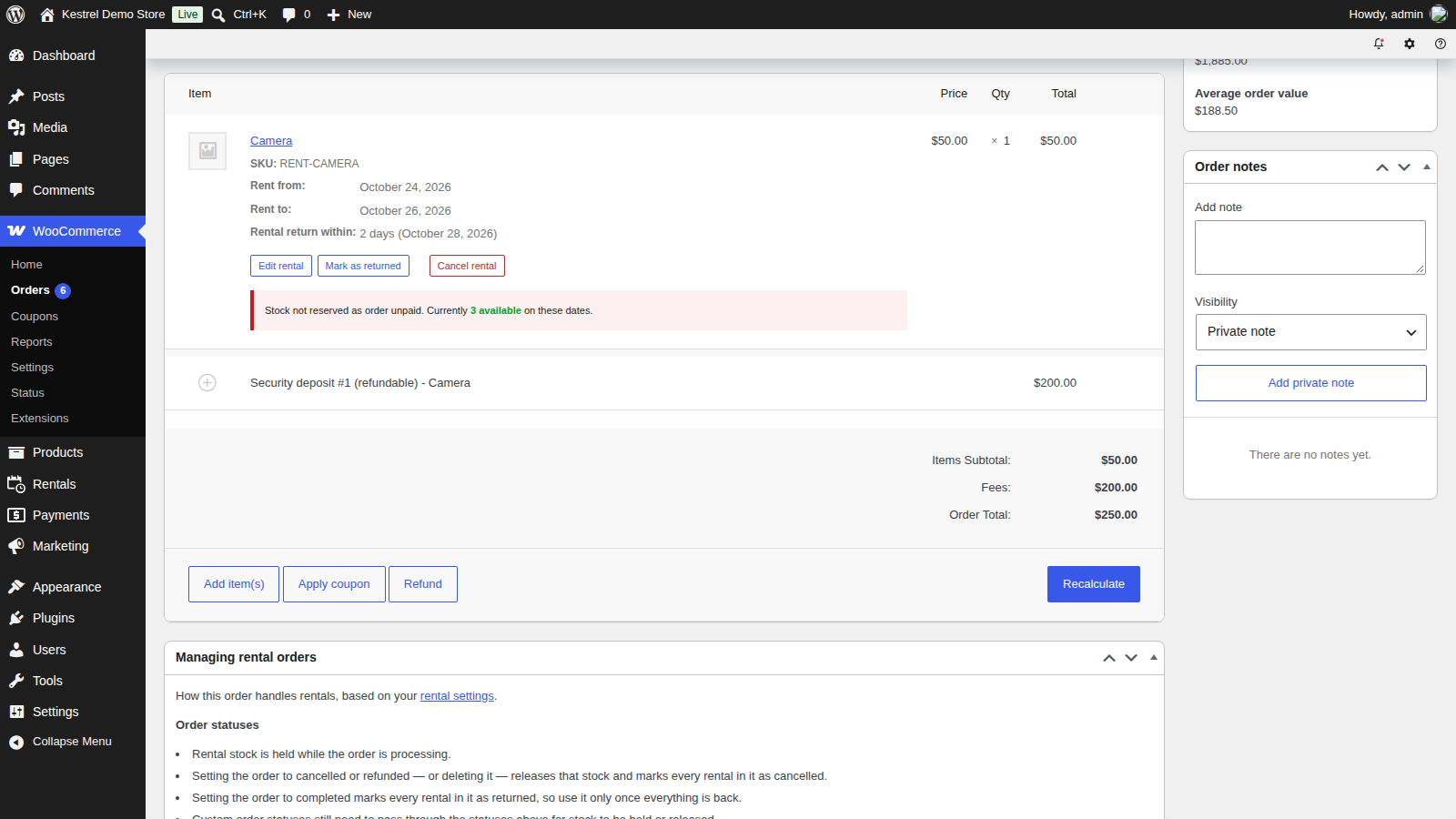
Before you use it
- Pending orders no longer block stock, including internal orders you use to block stock for repairs.
- Removing the snippet later: orders placed while it was active weren’t reserved when they were placed. Review unpaid rental orders before you remove it.
This approach suits stores that take payment methods that don’t complete instantly (bank transfers, checks, invoices) and want to prioritize whoever pays first, with manual control when demand exceeds supply. The default (reserving at once) is better when you want to guarantee the item to every customer who completes checkout.
How double bookings happen
Rental Products checks availability in the cart and on the order screen. When two orders end up holding the same unit, it’s usually one of these:
- An order was completed early. Completing an order marks its rentals returned and frees the units, so a shipping integration that completes orders on dispatch frees them while they’re still out. Turn off Return rentals in completed orders, or stop the integration completing rental orders.
- Two customers checked out for the last unit at almost the same moment.
- The reserve stock on payment snippet is active, so unpaid orders don’t hold stock.
- A checkout draft was moved to a status that holds stock with Checkout draft restrictions turned off.
- An admin overrode availability on the order screen with Apply these changes anyway.
- Rental stock was lowered below what’s already booked. Rentals » Inventory shows negative totals until those rentals come back.
- An express checkout or buy now button created an order line without rental dates, which reserves nothing. See express checkout buttons.
- Legacy mode with Product updated restrictions off, so carts kept prices and availability from before a product changed.
Keep learning
- Set up a rental product (the booking rules)
- Manage rental orders (returns, cancellations and blocking stock)
- Rentals dashboard, calendar and inventory
- Troubleshoot Rental Products